Guide #3: How to remove apps from the Google Play Store ‘My Apps’ list?


reznaf | 12:00 PM | , , , , ,


Is your Google Play Store “My Apps” section filled with too many spur of the moment apps that you will never download ever again? This can make it a royal pain finding those previously downloaded apps that you actually care about. Thankfully Google made it really easy to remove those unwanted apps which will make things a lot more manageable.

The process is pretty painless, but may take some time depending on how many apps you have in the list. I was able to get rid of 429 unused apps in about 15 minutes and my list of apps looks a heck of a lot cleaner now. So without hesitation hit the break below to check out our quick guide to cleaning up your previous Play Store acquisitions.

1 – Open up the Play Store.

2 – Be it on screen or physical button hit the Menu button and go to My apps.

uninstall2

3 – Swipe over to the right and go from INSTALLED to ALL.

uninstall4

4 – Here’s the kicker: Press and hold onto an app listed. It will highlight that app and you will see a checkmark at the top left along with “1 selected” and an “X” at the top right.

5 – Start tapping the apps that you want gone and number of selected apps will go up. Note: You won’t be able to select any apps that are currently installed.

uninstall5

6 – Once you have selected all the apps that you want deleted, hit the X in the top right corner, and tap OK to remove all of them.

You can also remove apps one by one by tapping the “X” that is to the right of every app listed (or circle with a line through it in older versions of the Play Store), but it’s not as efficient since you have to tap OK again for each app you want to remove.

While it may not be as simple as having a purchased apps tab, it will at least gives us a chance to clean those purchased and free apps up a bit. Maybe someday we’ll get that purchased tab back, but until then this may just be the next best thing.

sourcetalkandroid.com

Car Home Ultra v3.30 & Unlocker


reznaf | 8:00 AM | , , , ,


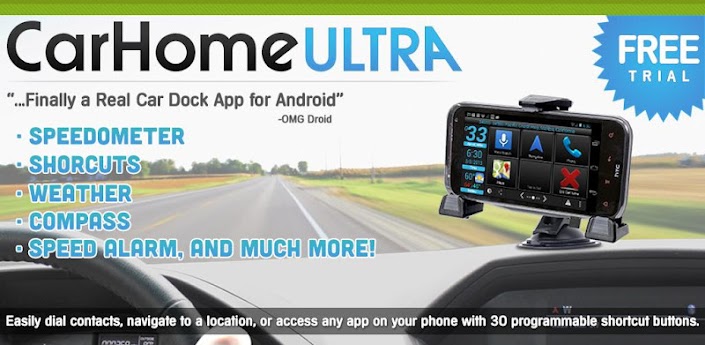
Description: Car Home Ultra is a Car Dock app that makes your phone much easier and safer to use while in the car.
**This is a 30 day trial, if you like the app please purchase CarHome Ultra License for unlimited use**
OMG Droid: "Car Home Ultra -- Finally a Real Car Dock App for Android"
http://omgdroid.com/app-review-car-home-ultra-finally-a-real-car-dock-app-for-android/
Applater: "A handy car dock application to help you use your device safely even while driving"
http://www.applatter.com/android/safety-first-with-car-home-ultra/#ixzz2A4mRNCUF"
Customize up to 18 shortcuts to launch apps, direct dial numbers, or even navigate to a specific location.
Customize the Data Panel with:
- Speedometer (Speaks when pressed)
- Compass
- Altimeter
- Battery Meter
- Clock
- Current Weather Conditions (Speaks when pressed)
- Current Location (Speaks when pressed)
- Speed Alarm
Other Features:
- Integrated Media Controls (Play/Pause, Next, Previous)
- 30 Custom Shortcuts
- Location alerts
- Custom Day/Night color schemes
- Auto switch between Day/Night based on Sunset and Sunrise
- Set to speaker phone mode when docked (optional)
- Starts CarHome when bluetooth connection is detected
- Auto Bluetooth on with Car Mode (optional)
- Auto Bluetooth off when exiting Car Mode (optional)
- Auto Wifi on/off with Car Mode (optional)
- Displays speed in KPH or MPH
- Displays temperature in Celsius or Fahrenheit
- Optionally hide status bar

Android OS Requierements: 2.3+

Screenshots:

More info:

Draw Something 2 v1.0.8


reznaf | 12:00 AM | , , , ,


Description: All new ways to draw, guess, and share with friends! Play Draw Something 2, the sequel to the smash-hit social drawing game loved by over 100 million players!
Create cool effects with dozens of new tools, patterns, stamps and colors - allowing you to transform even the simplest drawings into masterpieces.
For the first time ever, share your drawings in a feed for all of your friends to see! Follow your friends, celebs, and discover new artists - there’s always something new, funny and inspiring to check out!
...And There’s More!
• Gallery
A collection of all of your favorite drawings in one place
• Tons of New Words
Over 5,000 new words, including all new 9 letter words and phrases
• More Drawing Tools
Limitless creativity at your fingertips! Try out the Pixel pen, Pattern pencil, Stamps, Marker, Highlighter, Crayon and more. Plus, choose from over 100 vibrant colors
• All New Ways to Play
Earn coins for playing the Daily Guess and Daily Draw
• Free Draw
Draw anything. Try out your new tools, create and share something amazing
• Play with Friends
Challenge friends on Facebook or be automatically partnered with new people to play with
• Restricted Mode
Disable the Social Feed and gallery using a PIN. You can still play turns with friends and contacts, but you won't see any social content

Android OS Requierements: 2.3.3+

Screenshots:

More info:

GO Weather Forecast & Widget Premium v4.08


reznaf | 8:00 PM | , , , ,


Description: Weather Forecast - nearly 50 Million downloads with a high rating of 4.5 out of 5 stars! Have a try of it! It will be your best choice as it may go above and beyond your expectations! Please do not forget to rate us if it satisfies you! :)
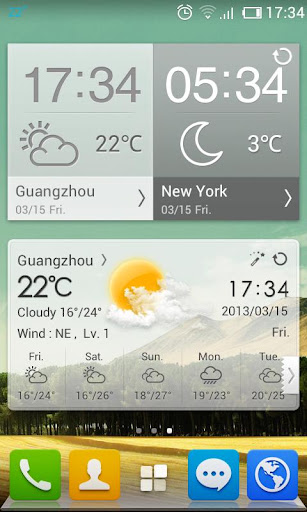
Detailed weather report, accurate weather forecast with variety of delicate widget themes and live wallpaper. It supports tens of thousands locations and cities and delivers accurate weather report to you at any time.
❤Basic Features:
-Detailed weather report (time, date, feel like, high and low temperature, wind, humidity, visibility, sunrise and sunset)
-5-day weather forecast
-Auto refresh weather report with frequency
-Accurate location positioning
-Live wallpaper for 7+ weather conditions in day and night mode: sunny, rainy, snowy, thunder, cloudy, overcast, foggy, etc.
-2*1, 4*1, 4*2 current weather widget (able to show lunar and holiday)
-4*1, 4*2 future weather forecast widget (able to show lunar and holiday)
-Weather notification display
-Dynamic background (available for mobile home screen)
-Share weather report
❤Pro Features
-Remove ads
-10-day weather forecast
-24 hour detailed weather forecast
-Chance of precipitation forecast
-World clock to display local time
-Exclusively designed widgets themes for Pro Version
-4*2 world clock widget
-Self-define temperature change alert

Android OS Requierements: 2.2+

Screenshots:

More info:

Fractal: Make Blooms Not War v1.0


reznaf | 4:00 PM | , , , ,


Description: From the creators of the award-winning games Auditorium and Pulse: Volume One comes Fractal, a new ambient music puzzler experience.

Combo, Chain, and Cascade your way through a pulsing technicolor dreamscape that reacts to your every move, while manipulating Fractals, creating Blooms, and expanding your consciousness at 130 BPM. On the surface it's a mere puzzle game, but as you dig deeper, untold dimensions of expression unfold. Intuitive but complex, challenging but not harsh, Fractal is a truly engaging experience.

Android OS Requierements: 2.2+

Screenshots:

More info:

PicsArt - Photo Studio (NoAds) v3.5.0


reznaf | 12:00 PM | , , , ,


Description: Install PicsArt - where everyone becomes a great artist!
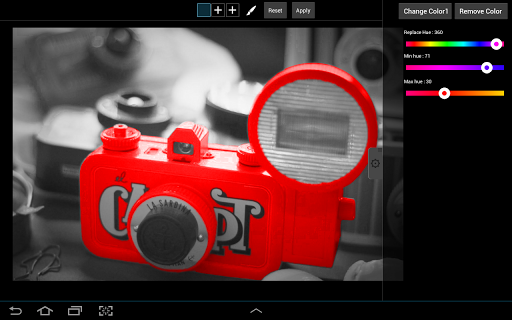
PicsArt is a free, full-featured photo editor and art community.
Packed with more features than in many paid apps, PicsArt has become one of the world's most popular photo apps by wrapping the best of what desktop photo and image editing suites can offer in an amazingly intuitive and easy-to-use user interface. We've backed that up with the ability to connect and share your work with a global community of other artists.
IMPORTANTLY, PicsArt will never sell your images. Ever.
PicsArt’s free, full-featured toolkit includes:
* Camera - enables you to take a picture and apply various effects by enhancing your standard camera.
* Picture Editor - Tons of photo manipulations, masks, collages, frames, borders, stickers, text effects, clipart graphics, callouts, crop, rotate, color adjust and more!
* Magic Effects - awesome artistic photo effects such as a stenciler, cartoonizer, sketcher, Orton, Lomo, vintage, cross process, HDR, fattal, pencil, Holgaart, watercolor, contours, comic, neon, gouache, old paper, pastel, red eye remover, Popart 2, smart blur, face fix, color splash, paper
and more!
* Draw - Many drawing effects including: draw, sticker mode, callouts, artistic brushes and text styles! Draw on your Facebook friend's photos and share your artwork with the World! Advanced functionality includes layers and the ability to hide, rearrange order, or merge layers.
* Sharing - if you want to share your images (and in PicsArt you don't have to), you can quickly share them with all major social networks or send photos by SMS and email.
* Live Wallpaper - enjoy amazingly funny color lines.
To learn more visit http://picsart.com and grab a look at the very best of the PicsArt network.
For a helpful comparison of PicsArt with other photo apps see this article: http://goo.gl/5xFve
Supported Languages - English, Japanese, German, Chinese, Polish, Korean, French, Spanish, Italian, Russian, Armenian

Android OS Requierements: 2.2+

Screenshots:

More info:

Aquaria v1.1


reznaf | 10:00 AM | , , , , ,


Description: Explore a massive underwater world, teeming with life and filled with secrets. Join Naija, a lonely and mysterious aquatic girl, as she explores the depths of Aquaria. As her story unravels, she’ll travel from hidden caves shrouded in darkness, to beautiful sunlit oases.

Control Naija with an intuitive touch screen interface. Use her singing ability to create your own music, affect nearby creatures, move pieces of the environment and even transform Naija into different beings. Combine ingredients harvested from the environment in the “cooking system” to create tasty items. Catch a ride on a seahorse or a giant turtle. Discover new costumes, treasures and hidden secrets. Challenge the ancient gods who lurk beneath the waves.


GIZMODO: "With handcrafted visuals and an ethereal soundtrack, Aquaria looks, feels and plays just like a gothic fairy-tale. And it’s not just a loving pastiche of the classic 2D games of yesteryear. Aquaria brings the genre bang up to date with a fresh concept and a unique control system." (Gaming App of the Day)

POCKETGAMER: "Aquaria is absolutely gorgeous, and filled with clever ideas and smart puzzles. Both a calming splash in the sea and a frantic fight against the elements, it's an essential iPad game." (Top 10 iOS Games, November 2011)

TOUCHARCADE: "a gorgeous and well-produced title with a sharp emphasis on world-building and character growth." (Best iOS Games, November 2011)

EDGE MAGAZINE: "Aquaria’s gloomy caverns are a delight to explore, and, a rarity for a modern Metroidvanias, the designers don’t constantly lead the way for you."


Will you journey to the land beyond the surface and brave the dark sinister waters below? Will you defeat the ancient beings of Aquaria or fall prey to them? Will you find a companion or wander the waters of Aquaria alone?
Android OS Requierements: 2.2+

Screenshots:

More info:

CalenGoo v1.0.101


reznaf | 8:00 AM | , , , ,


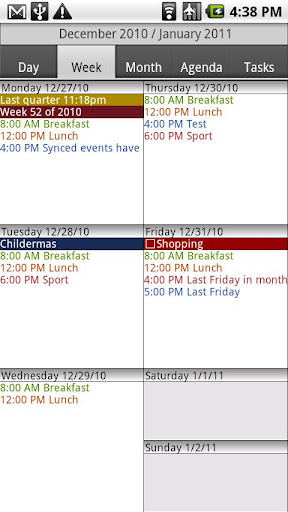
Description: CalenGoo is a calendar app that can sync with Android calendar and Google Calendar. It is designed to make it easier and faster to work with your calendar on your phone. Five different calendar views (day, week, month, agenda, landscape day) give you a good overview over your upcoming events. To make rescheduling events easy, they can be moved or copied via drag&drop in the day, week, month and landscape day view.
If you have any problems please contact android@calengoo.com! (Please ensure that you are using the correct email, someone in the reviews said he didn't get an answer, but I re-checked my emails and I did not get any email from him.) To find the settings you have to press the menu button of your phone. If you cannot find that button, please see here:http://android.calengoo.com/menubutton
Additional features:
- Drag&Drop support to move, copy, open and delete events
- Widgets to see your events on your home screen without opening the app: day widget (4x1, 4x2, 4x3), week widget (4x3, 4x4, 5x5), month widget (4x3, 4x4, 5x5) and agenda widget (different sizes from 2x1 up to 5x5). In the month 4x4 widget you can tap a single day to directly open it. The agenda widgets can be (optionally) scrollable (but under Android 2.x this requires a special home screen manager).
- Zoomable month view
- Configurable startup view (day, view, month, agenda)
- When adding recurring events you can use the same rules that you can use in Google Calendar, e.g. you can create events "on Monday and Thursday every two weeks" or "every last Friday in a month".
- Direct sync with Google Calendar option e.g. to download all historical data and to be able to assign icons to events
- Predefined and custom icons can be assigned when syncing directly (http://android.calengoo.com/icons )
- Improved date picker that displays a whole month to choose a date
- Improved time picker with three different ways to enter a time
- Search function (with optional advanced options like "Whole words" and "Case sensitive")
- Customizable hardware buttons (e.g. you can assign the "Today" function to the "back" button)
- Sync with Google Tasks
- Many configuration options to change the way the app looks and works.
- Repeatable, snooze-able reminders using a custom sound (e.g. an MP3 file from your phone) or one of the built-in sounds. You can choose a different sound for each calendar.
- The birthdays and anniversaries of your contacts can be displayed (http://android.calengoo.com/birthdays )
- Events can be sent as SMS or email. When sending them as email an ICS file is attached that the recipient can use to import the event into his own calendar.
- Functions to export/import entire calendars as ICS files.
- Completable events and floating events ( http://android.calengoo.com/completable )
- Templates to quickly create often used events. Templates can also be combined.
- Print function (to print the day, month, agenda or landscape day view into a PDF file)
- Support for Google's event colors (you have to sync via OAuth2 to use this, just add your Google account under "Settings", "Accounts", "Add account", "OAuth2 Login" in CalenGoo).

Android OS Requierements: 1.6+

Screenshots:

More info:

Related Posts Plugin for WordPress, Blogger...